
For the past few years, we have included LSMCD in our hosting services. However, the LSMCD service is a modified version of 'Memcached' that uses SASL for authentication, and it has honestly caused some problems.
The root of the issue lies with the original software, and despite our continuous requests, Litespeed has not yet provided a permanent solution to the SASL problems.
That's why we are thrilled to finally announce the much-awaited release of Redis, our specially developed cPanel plugin. Redis offers similar functionality to LSMCD and is fully compatible with the LSCache plugin, but it eliminates the need for SASL/authentication.
Moreover, the Redis instance is created within your cPanel user account using a custom socket, ensuring a secure environment that complies with the limitations of your cPanel user account (LVE constraints).
We have published an article that explains how to set up Redis, which you can find here...
How To: Enable Object Caching with Redis using LSCache
The first thing to do is to navigate to Redis in cPanel:
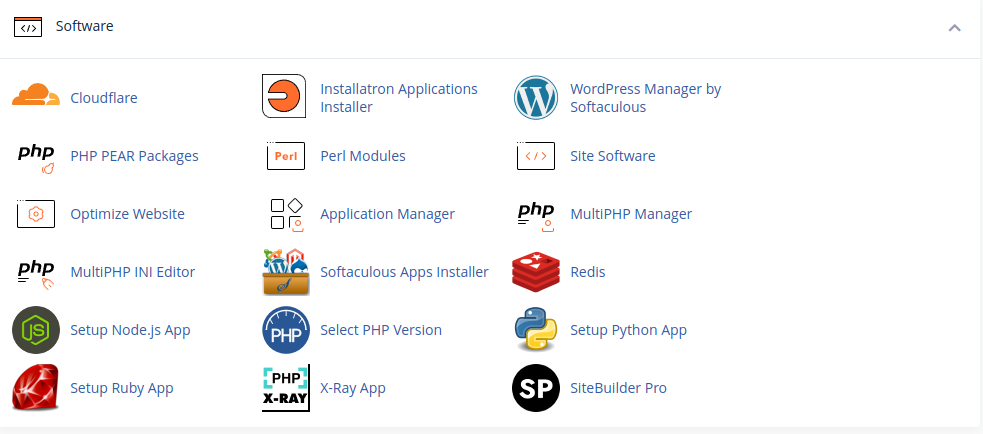
Once within the Redis tool enable it for your account:

Once enabled copy the Redis socket path as we will need this later! You can always come back to this screen if you need to view this again.
Now we need to enable the Redis extension, this is enabled under cPanel -> Select PHP Version -> Extensions -> Redis
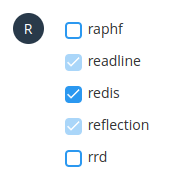
Once enabled we can log in to WordPress and access the LiteSpeed Cache.
Under Cache -> Object we can find the settings for enabling Redis:
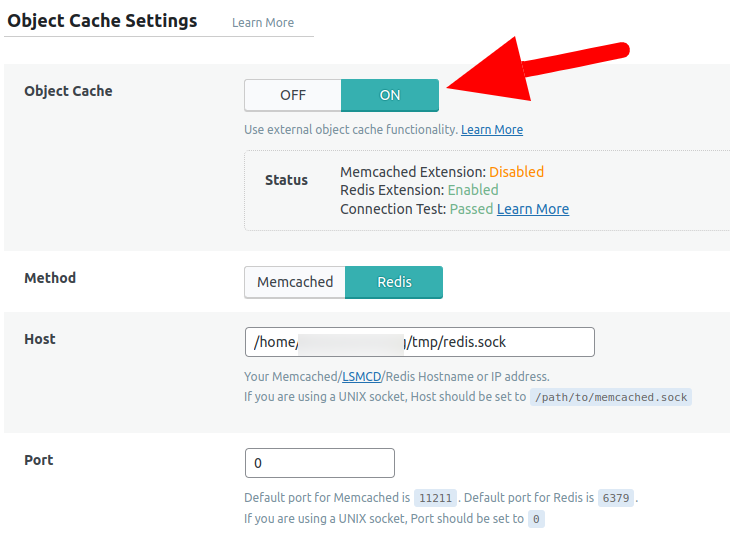
The settings we need to enable here are:
- Change Object Cache from Off to On
- Switch Method to Redis
- Set the Host to be the socket path noted down earlier
- Change the port to 0
Once done hit save and the Redis cache should be ready to go!