New Feature Announcement: Master Your Email Delivery with the Mail Delivery Center

Enable Object Caching with Redis using LSCache

Please note, that Redis is only available on our cPanel plans

The first thing to do is to navigate to Redis in cPanel:
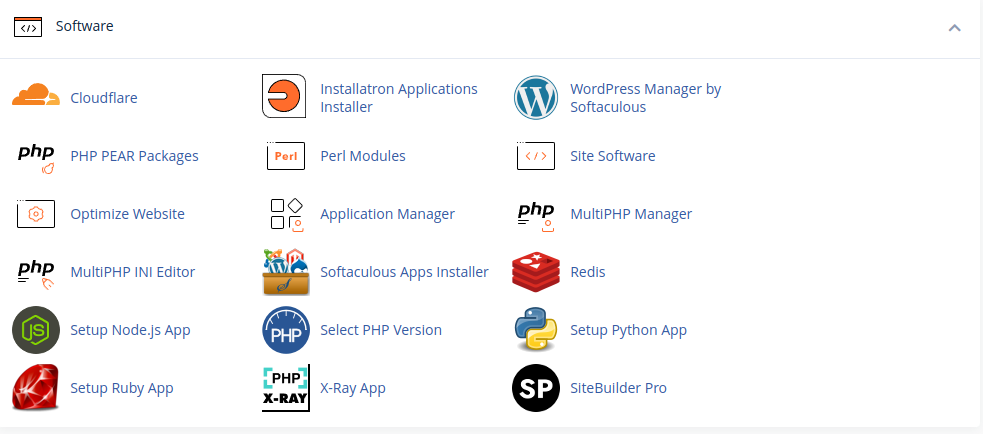
f3361001d054710f8a981ceab2176a87fb9b18ab901deecd398e8ef06a2d40327b843abc8d41332c?t=7a9083a03bc7baa8bd63596f9a4b9197

Once within the Redis tool, enable it for your account:Please note that you must use the socket local to your account, which we create on this screen. You cannot use the socket for another account (or the one we show here!).

Once enabled, copy the Redis socket path displayed in your cPanel account, as we will need this later! You can always come back to the Redis plugin screen within your cPanel account to see the path to your own Redis socket.

Please note that you must use the socket local to your account, which we create on this screen. You cannot use the socket for another account (or the one we show here!).

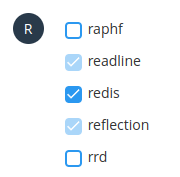
Now we need to enable the Redis extension; this is enabled under cPanel -> Select PHP Version -> Extensions -> Redis.
b90d43596909da08e36709a186a4d99f9578bdc66c286b49382c58e3129ce2e21a199104b5668f0a?t=e7642b817c8d3451f2dde2bec551188f

Once enabled, we can log in to WordPress and access the LiteSpeed Cache.

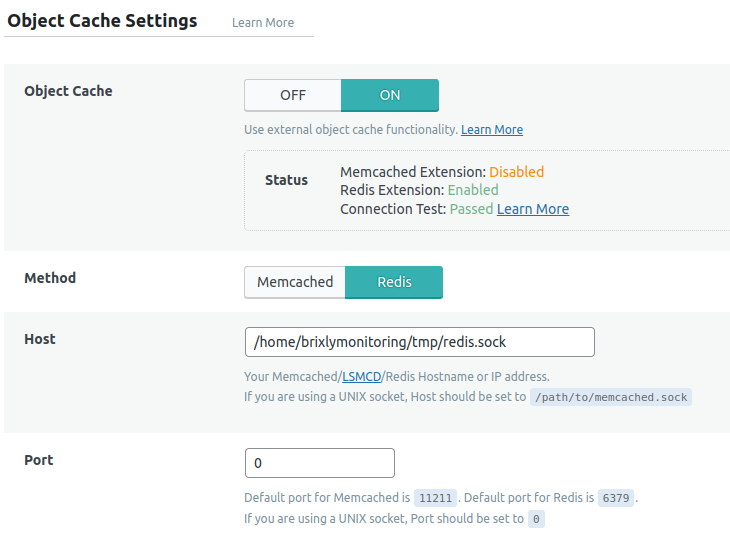
Under Cache -> Object, we can find the settings for enabling Redis:
5b2782ecae834612c21ec6589110bd7a3151ff56176107251aa44d231a9bdda53748f7d1e7e87c10?t=edd162a0885e8eae65954648622bc99d

The settings we need to enable here are:

  • Change Object Cache from Off to On
  • Switch Method to Redis
  • Set the Host to be the Redis socket path mentioned in the Redis plugin
  • Change port to 0

Once done, hit save, and the Object Cache should be ready to go!

  • 294 Users Found This Useful
Was this answer helpful?

Related Articles

 Connect to your server via SSH

SSH allows secure file transfer and remote logins over the internet. Your connection via SSH is...

 How to force your site to use SSL (HTTPS) using

First of all, you will need to install an SSL certificate to your siteOnce your certificate is...

 How do I change PHP versions, or change my PHP settings / config?

The process of setting your PHP version and the 'variables' (such as memory_limit values) differs...

 How do I install a free SSL via cPanel?

Installing an SSL certificate in cPanel is easy! Best of all, it's free with WebGee!Important:...

 How to send emails in WordPress using the WP SMTP Mail plugin

Instead of using the default PHP mail() function, you can send emails using our SMTP services via...

Powered by WHMCompleteSolution