If you receive the following error when using either our Elite module or our Domain Reseller module, then you will need to set a 'Default Payment Method' against your profile with us...
{"response":{"error":"WHMCS local API error: Invalid Payment Method. Valid options include banktransfer,gocardless,paypal,paypalcheckout,stripe,worldpayfuturepay"},"message_base":"productOrder"}It is important to understand that the payment method for the modules will not be utilized for capturing payments. Instead, the credit balance will be utilized for this purpose. Any payments necessary for the modules will be deducted from the credit balance rather than being charged to the selected payment method.
However, it is essential to note that having a payment method on file is still a requirement for accessing and using the modules. Consider it a "pre-requisite" for utilizing the modules effectively. This is necessary if any issues arise with billing via the credit balance. In such cases, the payment method will serve as a fallback option to ensure that any outstanding fees can be successfully processed and the modules can continue to be accessed and used without interruption.
Therefore, while the payment method will not be directly charged for the modules, its presence is still necessary as a fallback option to address potential billing issues. The credit balance will be the primary payment source, but the payment method will be used if any problems arise. It is always advisable to have a backup payment option to ensure seamless access and usage of the modules.
How do I set my default payment method?
To set your default payment method, select your name from the top-right of our client area, and select 'Account Details'
From here, you will need to update the 'default payment method' field to your preferred payment method.
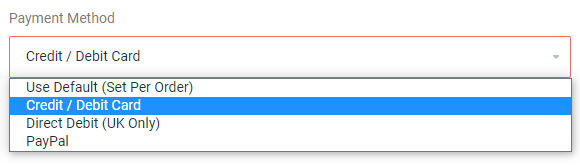
IMPORTANT: This will set all of your active services to use this payment method moving forward. If you paid with PayPal previously and set this to anything other than PayPal, you will need to cancel your PayPal subscriptions manually from within the PayPal interface.