New Feature Announcement: Master Your Email Delivery with the Mail Delivery Center

SpamExperts - How do I access SpamExperts for my domain?

You can log in to SpamExperts from within cPanel or DirectAdmin by clicking the 'SpamExperts' icon, and then clicking 'Login' next to the domain you wish to manage. 

Additionally, we have added the option to log in directly from our client area by using our 'Central Manager' (for more information on this, click here)

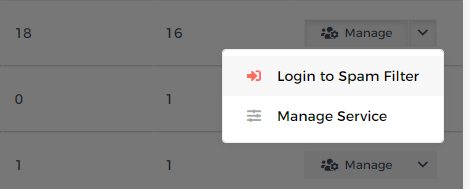
To log in from our client area, go to 'Reseller Tools' -> Central Manager, then click 'Manage' next to an account...
973cd44213869cfeca88e14673457248595516a3c87fcad57265ed9677564048b0fa3e6bba69de6d?t=0a2fe7ff02ba077388ab0689cb63c513

  • 368 Users Found This Useful
Was this answer helpful?

Related Articles

 Getting Started

Overview MailGee supports a variety of email clients, both on desktop computers and on...

 Android

Open the Email app. If this is your first email account, tap Add Account; if not, tap More and...

 Apple macOS / iOS

Method 1 via Mobileconfig¶ Email, contacts and calendars can be configured automatically on...

 eM Client

Launch eM Client. If this is the first time you launched eM Client, it asks you to set up your...

 KDE Kontact

Launch Kontact. If this is the first time you launched Kontact or KMail, it asks you to set up...

Powered by WHMCompleteSolution