WebGee now supports Memcached to improve performance via Object Caching, which reduces requests to MySQL for both front-end users and administrators of WordPress or Magento.
Please note that this is currently only available for cPanel as LSMCD does not currently provide plugin support on DirectAdmin.
To enable Memcached for your account, go to the following screen in cPanel...
cPanel -> LSMCD User Manager
From here, you will need to set a password using the 'Change Password' option.
Once this has been done, you will also need to enable the 'Memcached' PHP extension within cPanel, by going to...
cPanel -> PHP Selector -> Extensions
From here, ensure the 'Memcached' option is checked (note, there are Memcache and Memcached mentioned in the list - only the Memcached extension needs to be enabled).
Now that you have enabled Memcached on the account, you are able to set this up using the LSCache plugin for WordPress.
In your WordPress installation, go to Litespeed Cache from the main menu, and select 'Cache'...
Litespeed Cache -> Cache -> [6] Object
In this screen, ensure that 'Object Cache' is enabled, and that you have selected 'Memcached' as the 'Method'.
Ensure you are using 'localhost' as the Host, and the port is set to 11211
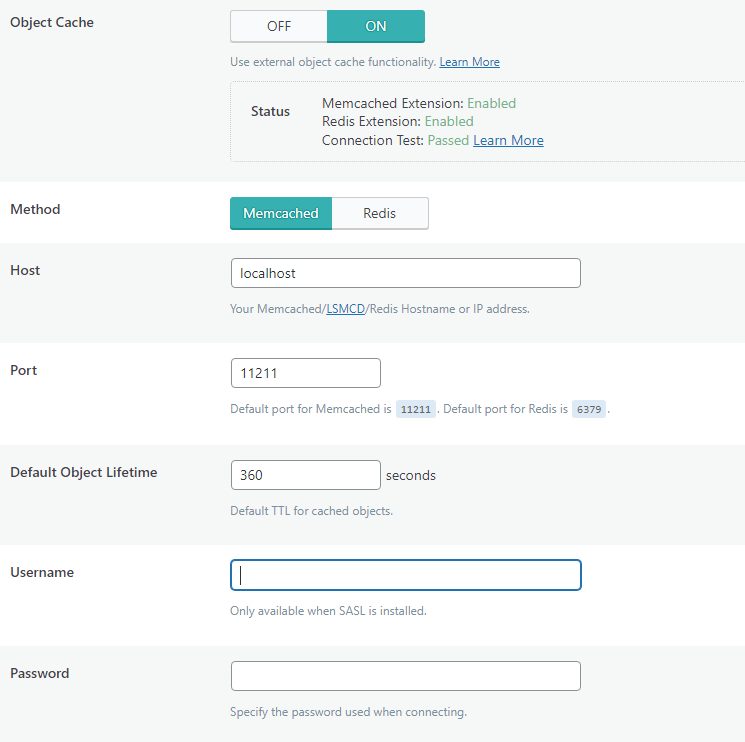
You will need to enter the cPanel username and the password you set within the LSMCD User Manager plugin of cPanel.
Once the changes have been saved, you will see the following...

Please note, we do not support Redis on our shared / reseller platforms, however, LSMCD is a secure alternative with equal performance benefits.