New Feature Announcement: Master Your Email Delivery with the Mail Delivery Center

How to Create a Subdomain in cPanel

Introduction

This article will go over creating a Subdomain under your cPanel account.


Procedure

1. Log into cPanel on the account.
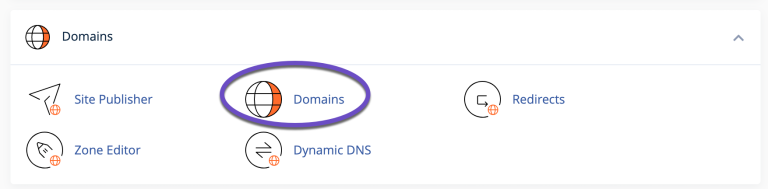
2. Click "Domains" under the "Domains" section.

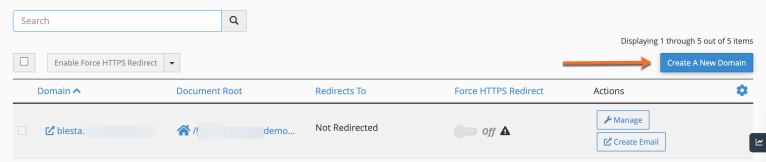
3. Click the "Create A New Domain" button.

4. Enter the subdomain name to add in the "Domain" text box.


5. Deselect the "Share document root (/home/username/public_html) with “domain.tld”." option.


6. Enter the directory where you want the files for this subdomain to exist.
7. Click the "Submit" button.


From cPanel > Domains area, you can see the list of subdomains under your main account, and you can manage or delete these subdomains anytime needed.

That’s it! You now know how to create subdomains in cPanel.

  • 290 Users Found This Useful
  • cpanel, subdomains
Was this answer helpful?

Related Articles

 Connect to your server via SSH

SSH allows secure file transfer and remote logins over the internet. Your connection via SSH is...

 How to force your site to use SSL (HTTPS) using

First of all, you will need to install an SSL certificate to your siteOnce your certificate is...

 How do I change PHP versions, or change my PHP settings / config?

The process of setting your PHP version and the 'variables' (such as memory_limit values) differs...

 How do I install a free SSL via cPanel?

Installing an SSL certificate in cPanel is easy! Best of all, it's free with WebGee!Important:...

 How to send emails in WordPress using the WP SMTP Mail plugin

Instead of using the default PHP mail() function, you can send emails using our SMTP services via...

Powered by WHMCompleteSolution