New Feature Announcement: Master Your Email Delivery with the Mail Delivery Center

How do I block particular countries from visiting my websites?

This quick and easy tutorial will show you how to control site access based on visitors’ location. With some tweaks to the .htacess file, allowing or blocking visitors from certain countries is possible.

There are a number of useful tools available online which provide you with 'deny' lists, that can be added to your .htaccess file. In this article, we will be using 'Country IP Blocks'...

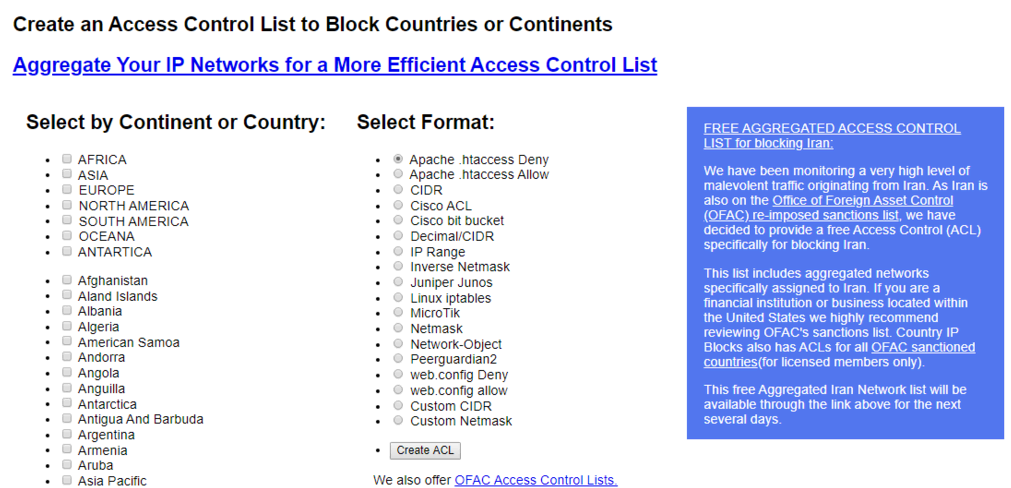
  1. Head to Country IP Blocks homepage.
  2. Select the countries you want to block or allow.
  3. Choose Apache .htaccess Deny or Apache .htaccess Allow in the Select Format section. The choice depends on whether you want to block or allow visitors from those countries.
  4. Click Create ACL.

    245aa1432d56b22da8bd1f4580d5c4e37696f8a9e9499605cd3f55c4381659a88943f3e429a4d2e9?t=089511629d341cae5aed6944cb0f4e87
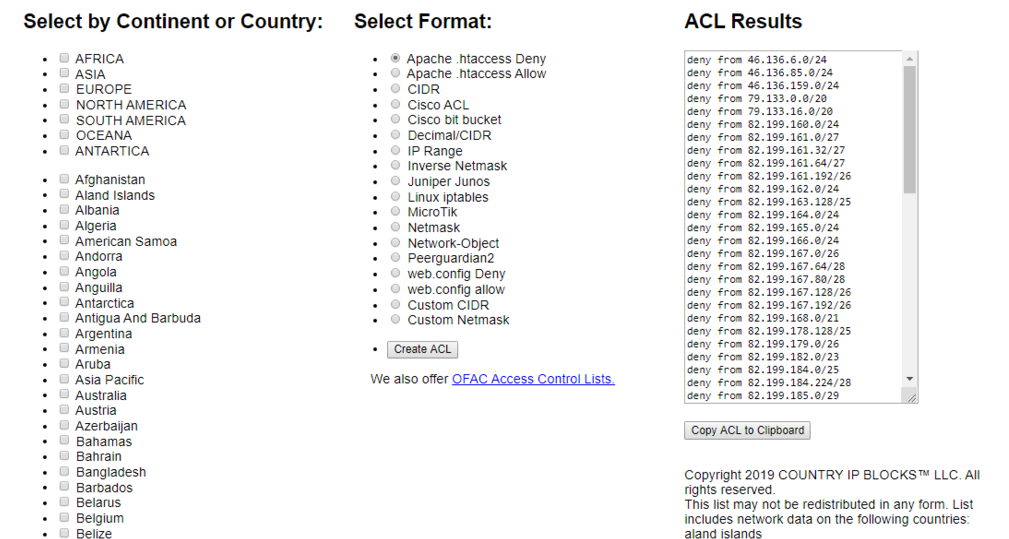
    1. The ACL results will appear on the right side of your screen. Press the Copy ACL to Clipboard button.
      8f227dfa1ebe0430f15366a8111e9e3c6d73553c6706cf55146b171a1c433f3533a2d57d1a59d5c9?t=64855b4b2c249026a2e34ea4872527c4
  5. From here, you will need to just paste the contents of the ACL into your .htaccess file. If you have contents already, its usually best to paste the contents after the rest of your .htaccess contents. 


  • 454 Users Found This Useful
Was this answer helpful?

Related Articles

 Connect to your server via SSH

SSH allows secure file transfer and remote logins over the internet. Your connection via SSH is...

 How to force your site to use SSL (HTTPS) using

First of all, you will need to install an SSL certificate to your siteOnce your certificate is...

 How do I change PHP versions, or change my PHP settings / config?

The process of setting your PHP version and the 'variables' (such as memory_limit values) differs...

 How do I install a free SSL via cPanel?

Installing an SSL certificate in cPanel is easy! Best of all, it's free with WebGee!Important:...

 How to send emails in WordPress using the WP SMTP Mail plugin

Instead of using the default PHP mail() function, you can send emails using our SMTP services via...

Powered by WHMCompleteSolution