When using WordPress Multisites with Subdomains, you need to ensure the subdomain is added to cPanel/DirectAdmin to be used.
cPanel
You can do this on cPanel via:
cPanel -> Domains -> Create a new domain
Here you will enter the name for the subdomain and also the document root; this should share the same Document root as the WordPress Multisite:
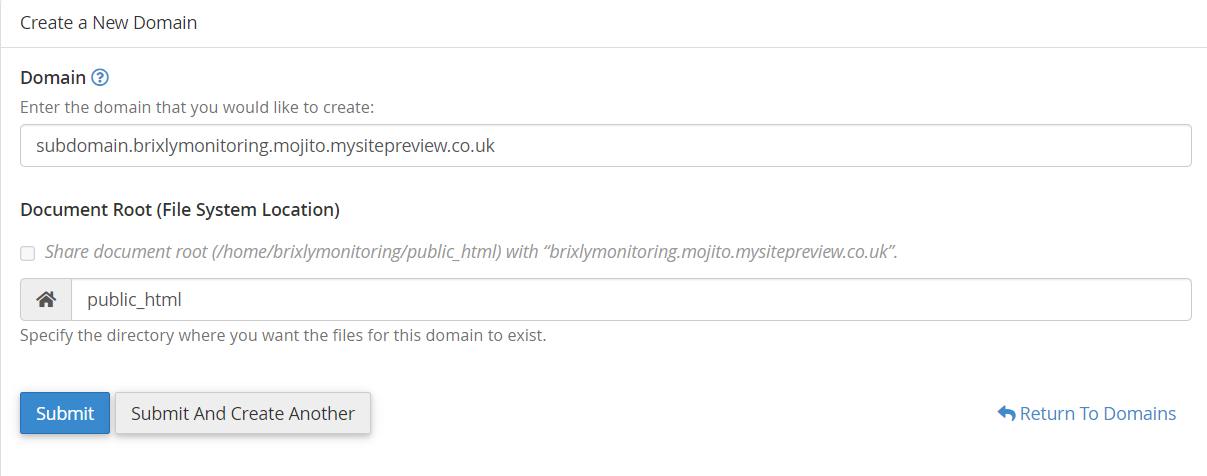
This will usually be the public_html directory, but if your WordPress Multisite is based on an addon domain will be located on a different path.
If you've already created the subdomain and need to update the document root from the Domains screen, instead click manage next to the subdomain: From here, set a new document root and hit update: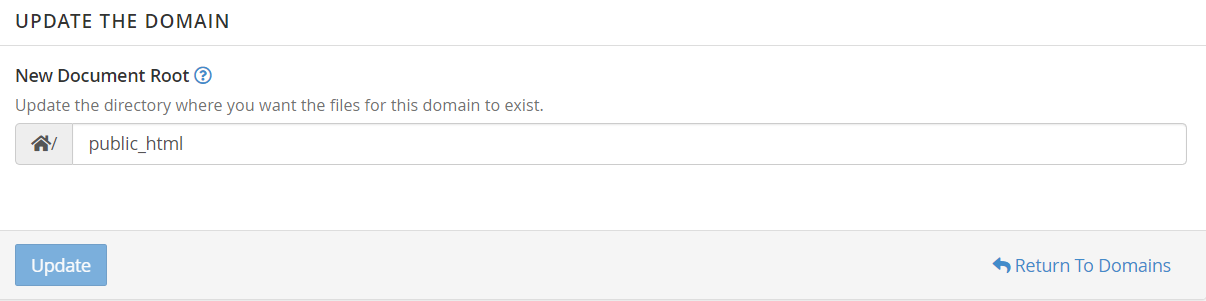
DirectAdmin
On DirectAdmin the process is similar, add a subdomain via:
DirectAdmin (User Level) -> Subdomain Management -> Add SubdomainOn DirectAdmin, we need to set the Document Root after creating the subdomain, by default DirectAdmin will set this to be:
/domains/yourdomain/public_html/subdomain
As such once the subdomain is created click the pencil button next to Docroot:
Then set the public_html and private_html to custom and to use the same Document root as the WordPress Multisite:

Hit save and wait a few minutes as DirectAdmin build the new document root configuration; you should now be able to visit and use the new document root.
Then set the public_html and private_html to custom and to use the same Document root as the WordPress Multisite:
Hit save and wait a few minutes as DirectAdmin build the new document root configuration; you should now be able to visit and use the new document root.