

Sometime in May 2026, the internet crossed a line: automated traffic overtook human traffic. Cloudflare, which handles around a fifth of the web, had forecast this for the second half of 2027. AI crawlers and agents pulled it forward by more than a year. In early June, Cloudflare's CEO reported that bots were making about 57% of requests for web pages.
For site owners this isn't just a statistic. Every bot request uses the same CPU, memory and bandwidth as a real visitor, and on many sites a growing share of that load comes from AI crawlers that send almost nobody back. This guide shows how to see how much of your traffic is bots, which ones to allow, and how to control the rest.
Key takeaways
- Automated traffic overtook human traffic in May 2026, according to Cloudflare.
- AI training made up 52% of crawler requests by June 2026, and most training crawlers send little traffic back.
- Bot requests use real CPU, memory and bandwidth, and can trigger 503 errors on shared hosting.
- Block training bots in robots.txt while allowing search bots, and enforce limits on the server for bots that ignore it.
- Full-page caching makes repeat crawls cheap, since most of what bots fetch hasn't changed.
How big is the shift?
Cloudflare's own figures from 2026 show how quickly it happened:
- Daily requests from AI agents grew by more than 1,700% in a year.
- AI training made up 52% of crawler requests by June 2026, up from 22% in spring 2025.
- More than half of what well-behaved bots fetch hasn't changed since their last visit.
- In some heavily crawled categories, human traffic fell by up to 40% in under a year, as people get answers from AI tools instead of clicking through.
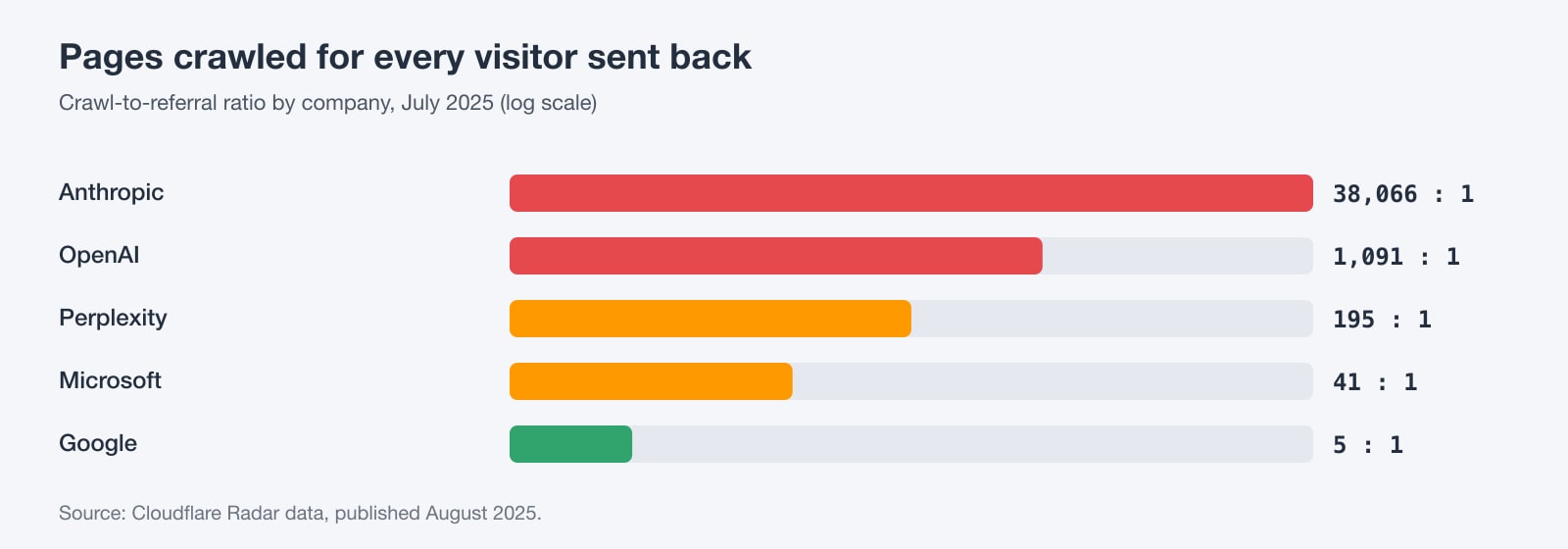
The imbalance is clearest in what Cloudflare calls the crawl-to-referral ratio: how many pages a company's bots crawl for each visitor its products send back. In July 2025, Google crawled about 5 pages per visitor referred. OpenAI crawled about 1,091. Anthropic crawled about 38,066. Search engines crawl to send you traffic; most AI training crawlers don't.
What it costs site owners
Some of the clearest examples come from organisations that published their numbers:
- Read the Docs reported that a single crawler downloaded 73 TB of files in May 2024, nearly 10 TB of it in one day, costing over $5,000 in bandwidth. Blocking AI crawlers cut its daily download bandwidth by 75%.
- Wikimedia found that bots made up about 35% of pageviews but at least 65% of its most resource-intensive traffic, because crawlers request pages that aren't in cache.
- SourceHut's founder described spending up to all of his working week fighting crawlers that ignored robots.txt, with dozens of short outages a week.
On a smaller site, the cost shows up differently. On shared hosting, every request counts against your account's resource limits. A burst of crawler requests to uncached pages can use up your PHP workers and trigger 503 errors or slowdowns for real visitors, the same symptoms we explain in our guide to LVE limits and 503 errors. On a VPS or cloud server, it shows up as CPU spikes and bandwidth use.
Step 1: Find out how much of your traffic is bots
Your web server's access log records the user agent of every request. These commands count requests and bandwidth by bot:
# Requests per AI and search bot
awk -F'"' '{print $6}' access.log \
  | grep -oiE 'GPTBot|OAI-SearchBot|ChatGPT-User|ClaudeBot|Claude-User|Claude-SearchBot|PerplexityBot|Perplexity-User|Googlebot|Bingbot|Applebot|meta-externalagent|Bytespider|CCBot|Amazonbot' \
  | sort | uniq -c | sort -rn

# Bandwidth per AI crawler
awk -F'"' '{split($3,a," "); ua=$6;
  if (match(ua,/GPTBot|ClaudeBot|Bytespider|CCBot|Amazonbot|meta-externalagent/))
    b[substr(ua,RSTART,RLENGTH)]+=a[2]}
  END {for (k in b) printf "%-20s %.1f MB\n", k, b[k]/1048576}' access.log

# The 20 busiest user agents overall
awk -F'"' '{print $6}' access.log | sort | uniq -c | sort -rn | head -20
On cPanel hosting, your raw access logs are under Metrics > Raw Access, or in ~/access-logs/ over SSH. On a VPS they're usually in /var/log/nginx/ or /var/log/apache2/.
Step 2: Know which bots to allow
Most AI companies run separate bots for training, for search and for fetching pages when a user asks. Blocking the wrong one can remove you from AI search, so it's worth knowing the difference:
- Training crawlers: GPTBot (OpenAI), ClaudeBot (Anthropic), meta-externalagent (Meta), CCBot (Common Crawl), Amazonbot (Amazon) and Bytespider (ByteDance). Blocking these doesn't affect your search visibility.
- AI search crawlers: OAI-SearchBot (ChatGPT search), Claude-SearchBot and PerplexityBot. Block these and you disappear from those AI search results.
- User-triggered fetchers: ChatGPT-User, Claude-User and Perplexity-User fetch a page because someone asked about it. OpenAI and Perplexity say these may not follow robots.txt, because a person initiated the request.
- Control tokens, not crawlers: Google-Extended and Applebot-Extended don't crawl at all. They tell Google and Apple whether content their normal crawlers fetched can be used for AI training. Blocking them doesn't affect Google Search or Apple search features.
Step 3: Set your rules in robots.txt
For most businesses, a sensible default is to stay visible in search and AI search while opting out of training:
# Opt out of AI model training
User-agent: GPTBot
User-agent: ClaudeBot
User-agent: Google-Extended
User-agent: Applebot-Extended
User-agent: meta-externalagent
User-agent: CCBot
User-agent: Bytespider
User-agent: Amazonbot
Disallow: /

# Stay in AI search
User-agent: OAI-SearchBot
User-agent: Claude-SearchBot
User-agent: PerplexityBot
Allow: /

# Everyone else, including Googlebot and Bingbot
User-agent: *
Allow: /
Sitemap: https://example.com/sitemap.xml
Anthropic, Common Crawl and Bing also honour a Crawl-delay line, such as Crawl-delay: 5, to slow down rather than block. Google and Amazon ignore it.
robots.txt is a request, not a lock Well-behaved crawlers from OpenAI, Anthropic, Google and others follow robots.txt, but nothing forces a bot to. User-triggered fetchers may skip it, Bytespider is widely reported to ignore it, and in 2025 Cloudflare reported Perplexity crawling with undeclared, browser-like user agents (Perplexity disputed this). For bots that misbehave, enforce limits on the server.
Step 4: Enforce limits on the server
Apache, LiteSpeed and cPanel hosting (.htaccess)
On Apache and LiteSpeed, including WebGee cPanel and WordPress hosting, you can refuse specific bots in .htaccess:
# .htaccess: refuse crawlers you don't want, with a 403
RewriteEngine On
RewriteCond %{HTTP_USER_AGENT} (Bytespider|CCBot|meta-externalagent) [NC]
RewriteRule .* - [F,L]
nginx: rate-limit AI crawlers instead of blocking
On your own VPS, nginx can slow AI crawlers down while leaving people and search engines untouched. Requests from other user agents get an empty key and are never limited:
# http {} block
map $http_user_agent $ai_bot {
    default "";
    ~*(GPTBot|ClaudeBot|CCBot|Bytespider|Amazonbot|meta-externalagent|PerplexityBot) $binary_remote_addr;
}
limit_req_zone $ai_bot zone=aibots:10m rate=30r/m;
limit_req_status 429;

# server {} or location / {}
limit_req zone=aibots burst=10 nodelay;
Check that a "Googlebot" really is Google
User agents are easy to fake, and scrapers often pretend to be Googlebot to get past rules. Verify with a reverse DNS lookup and then a forward lookup that returns the same IP. OpenAI, Anthropic and Perplexity publish their crawler IP ranges as JSON files instead.
# Reverse lookup: a real Googlebot resolves to googlebot.com or google.com
host 66.249.66.1
# crawl-66-249-66-1.googlebot.com

# Forward lookup must return the same IP
host crawl-66-249-66-1.googlebot.com
# 66.249.66.1
Step 5: Cache, so bots cost you less
Since more than half of what bots fetch hasn't changed since their last visit, the cheapest fix is often a full-page cache. A cached page is served straight from memory or disk, without running PHP or querying the database, so a crawler burst barely registers. On WordPress, the LiteSpeed Cache plugin does this on LiteSpeed servers once it's enabled. On other stacks, use nginx FastCGI cache, Varnish or a CDN cache.
Step 6: Use your CDN's AI controls
If your site uses Cloudflare, you now have per-purpose controls. Since July 2026 you can allow or block crawlers separately for search, agent use and training, or block them only on pages with ads, on every plan including Free. On September 15, 2026, Cloudflare changed the default for new sites, and for Free-plan sites that hadn't changed their settings: search is allowed, but training and agent use are blocked on pages with ads. Crawlers that mix search and training without letting you choose are blocked on those pages.
If you use Cloudflare, check these settings now. The new defaults may already be in effect on your site, and you might prefer a different choice. Cloudflare also lets you add Content Signals, such as Content-Signal: search=yes, ai-train=no, to your robots.txt to state your preferences.
AI bot control checklist
- Count bot requests and bandwidth in your access logs
- Decide: stay in AI search, opt out of training, or both
- Update robots.txt with separate rules for training and search bots
- Block or rate-limit bots that ignore robots.txt on the server
- Verify anything claiming to be Googlebot before trusting it
- Turn on full-page caching so repeat crawls are cheap
- Review your CDN's AI crawler settings and defaults
Hosting that keeps bots from slowing you down
Bot traffic is now a normal part of running a website, so your hosting needs to absorb it. WebGee hosting runs on LiteSpeed web servers, which support LiteSpeed Cache: a full-page cache that serves repeat requests without touching PHP. You get full control over .htaccess and robots.txt, access to your raw logs, Cloudflare CDN integration on cPanel cloud hosting, and 24/7 support from engineers who can help you read your logs and spot a crawler problem.
If bots are regularly pushing your site into its resource limits, a cloud server gives you dedicated resources and full control over nginx, rate limits and firewalls.
Frequently asked questions
Will blocking GPTBot remove my site from ChatGPT?
No. GPTBot collects training data. ChatGPT search uses OAI-SearchBot, so allow OAI-SearchBot if you want to appear in ChatGPT search results.
Does blocking Google-Extended affect my Google rankings?
No. Google-Extended only controls whether your content is used for Gemini training and grounding. Google says it doesn't affect inclusion in Google Search or rankings.
Do all AI bots respect robots.txt?
No. Major training and search crawlers say they do, but user-triggered fetchers may not, and some crawlers such as Bytespider are widely reported to ignore it. Use server rules or your CDN for those.
How do I know if bots are slowing my site down?
Count requests by user agent in your access logs and compare busy periods with your resource usage. On cPanel, check Resource Usage for limit hits around the same times.
What changed at Cloudflare on September 15, 2026?
For new sites, and for Free-plan sites that hadn't changed their settings, Cloudflare now allows search crawlers but blocks AI training and agent use on pages with ads by default.
