

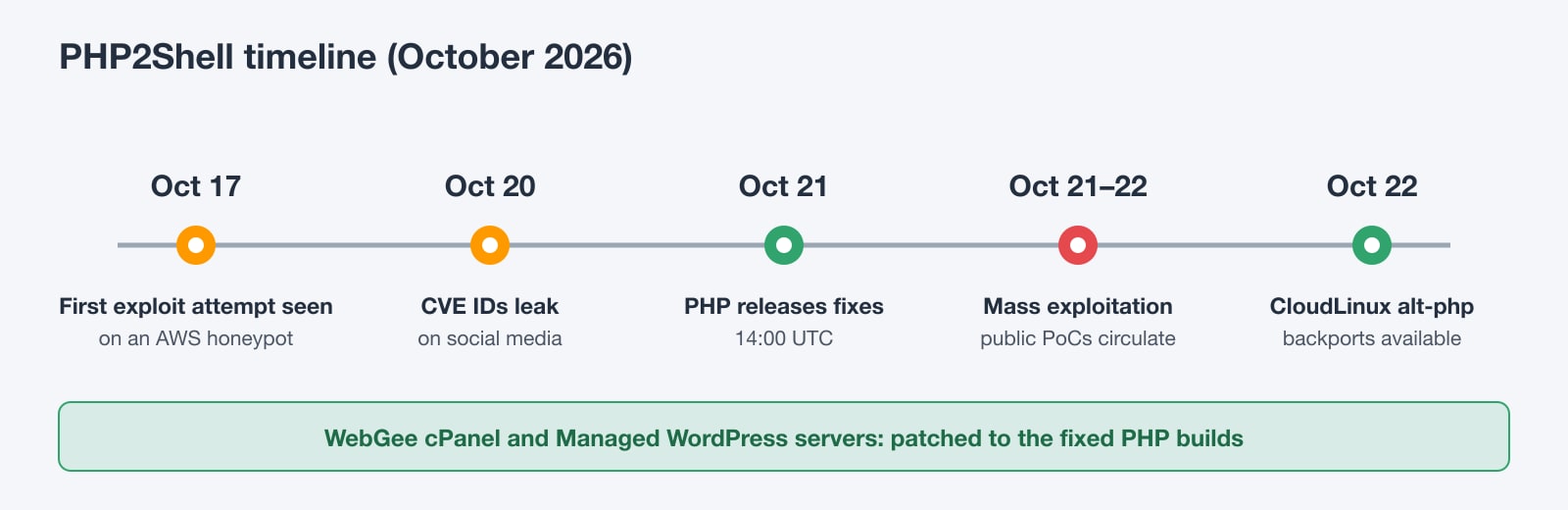
On October 21, 2026, the PHP project shipped emergency releases for two critical flaws, CVE-2026-109618 and CVE-2026-109619, now known as PHP2Shell. Chained together, they let an attacker run code on a server with a single crafted HTTP request. The attacker needs no login, no vulnerable plugin and no misconfiguration. If PHP answers web requests on your server, it is exposed until it is updated.
Attackers were testing the bug days before the fix shipped, and mass exploitation started within hours of the release. Security researchers estimate that 1.3 to 1.9 million internet-facing hosts were exposed. This guide explains what the vulnerabilities are, which versions are fixed, how to patch a private server step by step, and how to check whether someone got in before you did.
Key takeaways
- PHP2Shell is two critical PHP bugs (CVSS 9.2) that allow unauthenticated remote code execution with one HTTP request.
- Every PHP version from 5.4 onward is affected when it serves web traffic: mod_php, PHP-FPM, CGI, FrankenPHP and LiteSpeed.
- Fixed releases are 8.2.35, 8.3.36, 8.4.27 and 8.5.12. Restart all PHP workers after updating.
- All WebGee cPanel and Managed WordPress servers are already patched; customers don't need to do anything.
- Exploitation began before the fix, so check your logs and files for signs of compromise even after patching.
WebGee customers: you're already protected Our engineers patched every WebGee cPanel shared and reseller server and every Managed WordPress Hosting server to the fixed PHP builds, then restarted all PHP workers. You don't need to do anything. This guide is for servers you manage yourself, such as a VPS, a dedicated server or a cloud server with root access.
What is PHP2Shell?
PHP2Shell is the name for two memory-safety bugs in PHP's core request handling. Both sit in code that runs before your application (WordPress, Laravel, Magento or anything else) sees the request. That's why keeping your CMS and plugins up to date doesn't protect you here.
CVE-2026-109618: out-of-memory corruption during request parsing
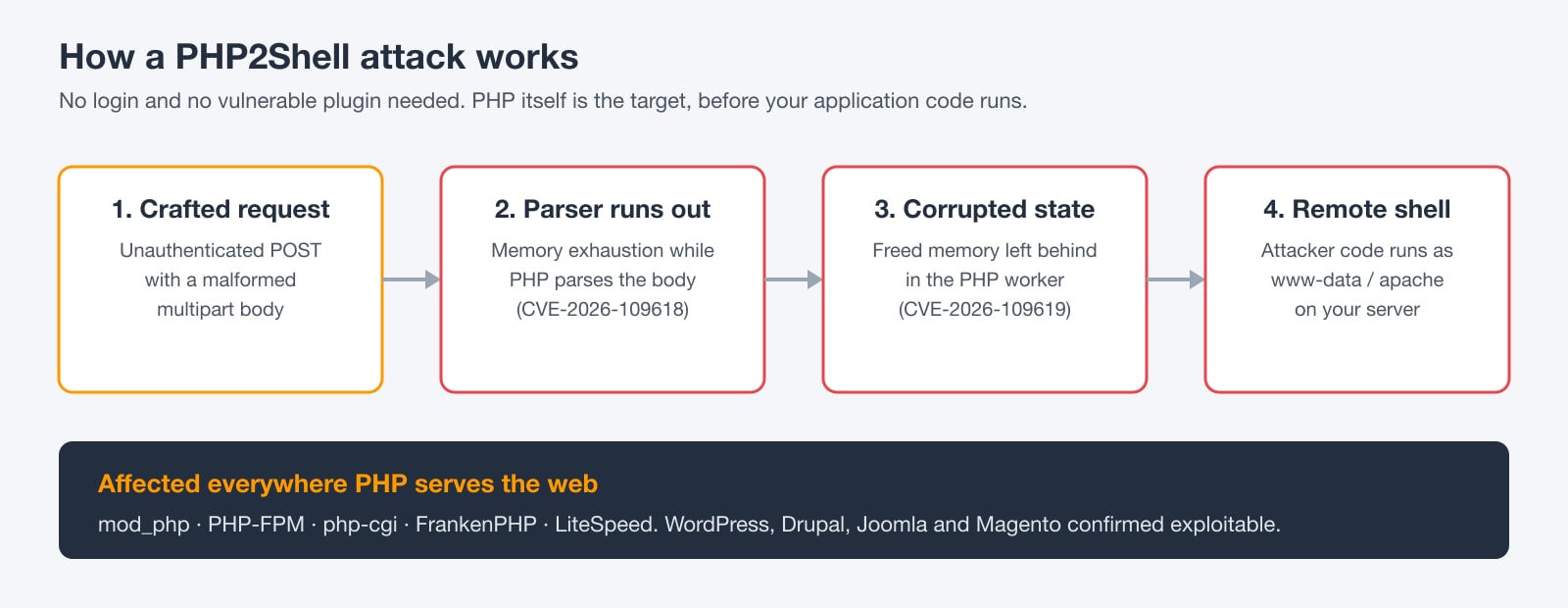
When PHP parses a multipart/form-data body (the format used by forms and file uploads), running out of memory partway through leaves internal structures half-initialised. PHP's cleanup code then treats that broken state as valid. A crafted request can force this condition even on servers with normal memory limits.
CVE-2026-109619: stale global state and use-after-free
PHP handles fatal errors with longjmp(), which jumps out of the failing code without unwinding it. After the memory error above, request-owned global state can be left pointing at memory that has already been freed. The next request handled by the same PHP worker can then use that memory. Researchers have confirmed both memory disclosure and full remote code execution.
Together the two bugs turn one malformed POST request into a shell running as your web server user (www-data, apache or nobody). From there an attacker can read your wp-config.php and database credentials, plant backdoors, send spam or move deeper into your network.
How serious is it?
- Severity: both CVEs are rated CVSS v4.0 9.2 (Critical). Early advisories circulated a score of 10.0.
- Authentication: none required. The bug is reachable on any URL that PHP processes.
- Exploitation: confirmed in the wild, and public proof-of-concept code is circulating.
- Applications: pre-auth code execution has been demonstrated against WordPress, Drupal, Joomla and Magento.
- Age: the vulnerable code path goes back to PHP 5.4.0, so very old servers are affected too.
Who is affected?
Every PHP installation that serves web traffic, whatever server API it uses:
- Apache with mod_php: the highest risk, because the vulnerable parsing runs inside the Apache worker itself.
- PHP-FPM behind nginx, Apache or Caddy.
- php-cgi, FrankenPHP and LiteSpeed (LSAPI).
Command-line-only PHP (cron jobs, workers that never parse HTTP bodies) isn't directly reachable, but the same binary is usually installed for the web too. Update everything.
Fixed PHP versions
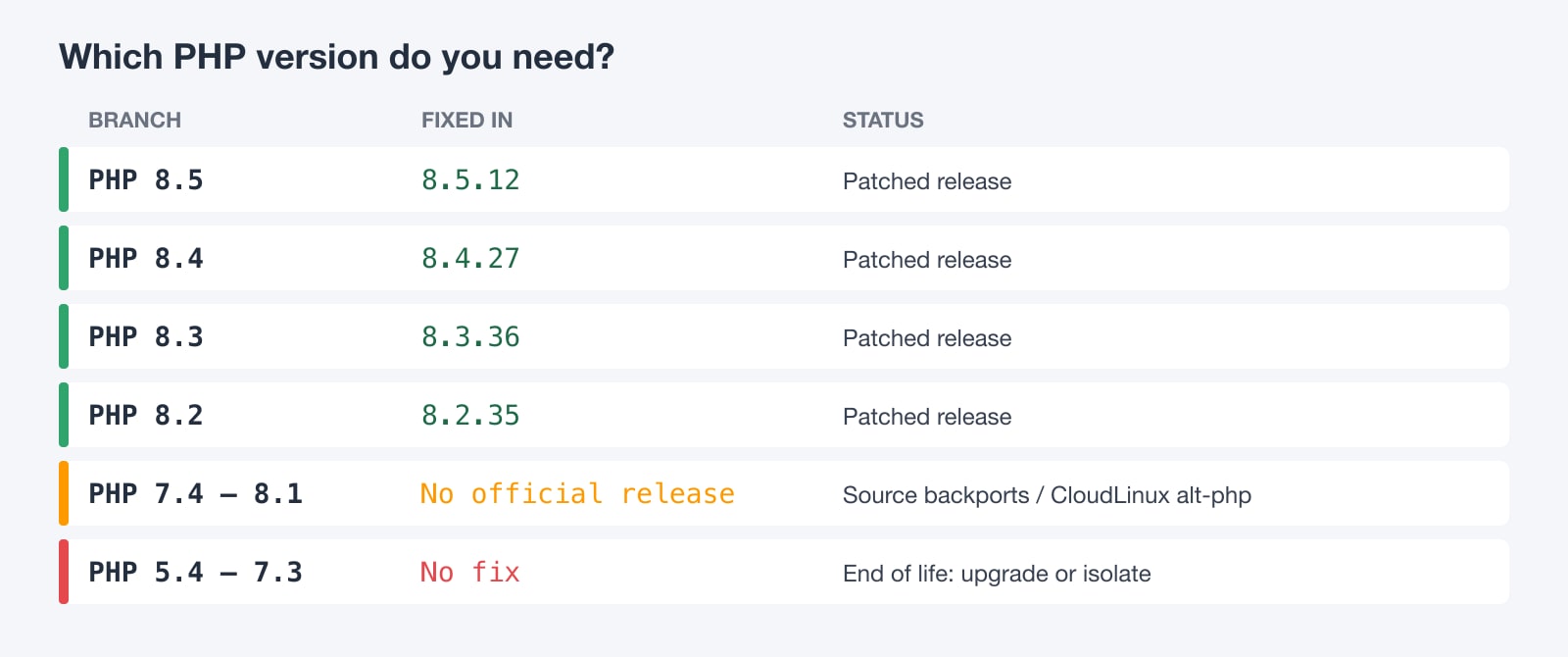
Upgrade to at least the release below for your branch:
- PHP 8.5: 8.5.12 or later
- PHP 8.4: 8.4.27 or later
- PHP 8.3: 8.3.36 or later
- PHP 8.2: 8.2.35 or later
- PHP 7.4 to 8.1: no official release. Fixes exist only as source backports and through vendors such as CloudLinux (alt-php) and some Linux distributions.
- PHP 5.4 to 7.3: end of life, with no fix. Upgrade, or take the site off the public internet.
Step 1: Check which PHP version your server runs
Check both the command-line binary and the version your web server actually uses. They're often different.
# Command-line PHP
php -v

# Every PHP binary installed on the server
ls /usr/bin/php* /usr/sbin/php-fpm* /opt/cpanel/ea-php*/root/usr/bin/php /opt/alt/php*/usr/bin/php 2>/dev/null

# The version your web server serves: drop a temporary file, fetch it, then delete it
echo '<?php echo PHP_VERSION;' | sudo tee /var/www/html/v.php >/dev/null
curl -s https://your-domain.com/v.php; echo
sudo rm /var/www/html/v.php
Don't leave phpinfo() files behind If you use a phpinfo() or version file to check, delete it immediately afterwards. Attackers scan for these files to fingerprint vulnerable servers.
Step 2: Patch PHP on your server
Pick the section for your platform. After updating, you must restart every PHP process. Old workers keep running the vulnerable code until they're replaced.
Ubuntu and Debian
sudo apt update
sudo apt install --only-upgrade 'php*-common' 'php*-cli' 'php*-fpm' 'libapache2-mod-php*'

# Restart PHP-FPM (repeat for each installed version)
sudo systemctl restart php8.3-fpm

# Using mod_php? Restart Apache instead
sudo systemctl restart apache2

# Confirm
php -v
If you install PHP from the ondrej/php PPA or a similar third-party repository, make sure that repository has published the fixed builds before you assume you're patched.
AlmaLinux, Rocky Linux and RHEL
sudo dnf clean all
sudo dnf upgrade 'php*'

# Restart PHP-FPM and the web server
sudo systemctl restart php-fpm
sudo systemctl restart httpd   # or nginx

php -v
cPanel and WHM servers (EasyApache ea-php)
cPanel ships PHP as ea-php packages. Update all of them at once:
# CloudLinux / CentOS 7
yum clean all && yum update "ea-php*"

# AlmaLinux / CloudLinux 8, 9 and 10
dnf clean all && dnf upgrade "ea-php*"

# Restart PHP-FPM for all accounts, then Apache or LiteSpeed
/scripts/restartsrv_apache_php_fpm
/scripts/restartsrv_httpd

# Check each installed version
for p in /opt/cpanel/ea-php*/root/usr/bin/php; do echo -n "$p: "; $p -r 'echo PHP_VERSION, PHP_EOL;'; done
CloudLinux alt-php (PHP Selector)
CloudLinux backports the fix into every alt-php branch, including end-of-life versions such as 5.6 and 7.4. The version number doesn't change, so check the package changelog instead of php -v:
yum clean all && yum update 'alt-php*' 'ea-php*' -y

# Confirm the fix is in the installed package (example: alt-php 7.4)
rpm -q --changelog alt-php74 | grep -m1 -i 'CVE-2026-109618'
Docker and containers
Containers don't update themselves. Pull the patched official image, rebuild and redeploy:
# Pin to a fixed release (or newer)
FROM php:8.3.36-fpm

# ...your existing build steps
docker pull php:8.3.36-fpm
docker compose build --pull
docker compose up -d
# Confirm inside the running container
docker compose exec app php -vStep 3: Interim mitigations if you can't patch today
These settings reduce exposure but do not fix the bug. Use them only to buy time while you schedule the upgrade, for example on PHP 7.3 or older where no fix exists.
Harden php.ini
The exploit depends on PHP's own memory limit being hit during parsing. Disabling that limit at the PHP level (and enforcing a hard limit elsewhere, see below) closes the main trigger. Upload progress tracking is another path into the vulnerable code.
; /etc/php/8.3/fpm/conf.d/99-php2shell.ini  (adjust the path to your version)
; Interim mitigation for CVE-2026-109618 / CVE-2026-109619

memory_limit = -1
session.upload_progress.enabled = 0
post_max_size = 1M

; PHP 8.5 only
fatal_error_backtraces = 0
Applications such as WordPress raise memory_limit themselves at runtime. Lock the values in the PHP-FPM pool so code can't override them:
; /etc/php/8.3/fpm/pool.d/www.conf
php_admin_value[memory_limit] = -1
php_admin_flag[session.upload_progress.enabled] = off
Always pair memory_limit = -1 with a hard limit With no PHP memory limit, one runaway script can eat all of the server's RAM. Cap memory at the process level instead, with a systemd MemoryMax for the PHP-FPM service or a container memory limit, so the kernel stops a runaway worker rather than PHP.
# Cap PHP-FPM memory with systemd
sudo systemctl edit php8.3-fpm
#   [Service]
#   MemoryMax=2G

# Or, for Docker:
docker update --memory 2g --memory-swap 2g <container>
Limit request body size at the web server
Reject oversized bodies before PHP ever sees them. This blocks the large crafted payloads used in public exploits, but it will also block legitimate large uploads, so raise the limit only on the paths that need it.
# nginx: inside http {} or server {}
client_max_body_size 1m;

# Allow bigger uploads only where needed, e.g. the WordPress media uploader
location = /wp-admin/async-upload.php {
    client_max_body_size 64m;
    include fastcgi_params;
    fastcgi_pass unix:/run/php/php8.3-fpm.sock;
}
# Apache: in the vhost or .htaccess (bytes)
LimitRequestBody 1048576Then restart all PHP workers so that none of them is still holding corrupted state:
sudo systemctl restart php8.3-fpm
sudo systemctl reload nginx   # or: sudo systemctl restart apache2
If your site sits behind Cloudflare, enable its managed WAF rules for this vulnerability; Cloudflare has made protection available on the free plan too. Treat a WAF as an extra layer, though, not a replacement for patching. CERT-EU also recommends isolating internet-facing PHP applications that can't be patched right away.
Step 4: Check whether you were already compromised
Exploitation started before most people could patch, so updating isn't the end of the job. Look for these signs.
Out-of-memory errors at line 0
Failed or successful attempts leave a fatal memory error with no real file or line, usually next to an unusually large POST:
sudo grep -R "Allowed memory size of .* exhausted .* in Unknown on line 0" \
  /var/log/php*-fpm.log /var/log/apache2/error.log /var/log/httpd/error_log \
  /var/log/nginx/error.log 2>/dev/null | tail -n 50
Worker crashes
# Apache children dying with segfaults
sudo grep -R "AH00052: child pid .* exit signal Segmentation fault" /var/log/apache2/ /var/log/httpd/ 2>/dev/null

# PHP-FPM workers killed by signals
sudo grep -R "exited on signal" /var/log/php*-fpm.log 2>/dev/null
Shells started by the web server user
# A shell running under apache, www-data or php-fpm is a red flag
ps aux | grep -E "(apache|www-data|php-fpm|nobody)" | grep -E "\b(sh|bash|dash)\b" | grep -v grep

# Unexpected outbound connections from the web user
sudo ss -tunp | grep -E "php|apache|httpd|nginx"
Backdoors and persistence
# PHP files changed in the last 7 days
sudo find /var/www -type f -name "*.php" -mtime -7 -printf "%TY-%Tm-%Td %TH:%TM  %p\n" | sort -r | head -n 50

# PHP files in upload folders (they should never be there)
sudo find /var/www -path "*uploads*" -name "*.php"

# Cron jobs added for the web user
sudo crontab -u www-data -l 2>/dev/null; sudo crontab -u apache -l 2>/dev/null
In your access logs, look for POST requests with huge form field names (over 1 MB), binary or null bytes in the body, or a shape like =[binary]&a=1&[long field][x]=1.
A successful exploit doesn't always crash anything, so a clean log isn't proof that you're safe. If you find any of these signs, assume compromise:
- take the site offline or behind maintenance;
- rotate database passwords, API keys and WordPress salts;
- restore from a backup taken before October 17, 2026;
- then patch before bringing the site back online.
PHP2Shell response checklist
- Find every PHP version on the server, CLI and web
- Upgrade to 8.2.35, 8.3.36, 8.4.27, 8.5.12 or a vendor backport
- Restart PHP-FPM, Apache or LiteSpeed so no old workers remain
- Rebuild and redeploy containers from patched images
- Apply interim php.ini and body-size limits on anything you can't patch yet
- Search logs for line-0 memory errors and segfaults
- Check for web-user shells, new PHP files and new cron jobs
- Rotate credentials if anything looks suspicious
Why this keeps happening, and how managed hosting helps
PHP2Shell went from first honeypot hit to mass exploitation in less than a week, and most of that happened before a fix existed. For a business that runs its own server, defending against that means someone watching security feeds around the clock, testing updates, and rolling them out to every PHP version and every worker the moment they ship. Often that has to happen at 2 a.m., on a weekend, while public exploits are already being used.
That's exactly what our team does for WebGee customers. For PHP2Shell, our engineers:
- applied the fixed PHP builds across all cPanel shared and reseller servers;
- updated all Managed WordPress Hosting servers to the latest patched PHP;
- restarted every PHP worker so no vulnerable process was left running;
- did all of this with no action needed from customers.
On top of patching, WebGee hosting includes server-level malware scanning, a web application firewall and daily backups. If an attack does get through somewhere, you have a clean restore point.
If you're running WordPress, WooCommerce or another PHP application on a server you have to patch yourself, consider letting us take that off your plate. We'll move your site for free, with zero downtime.
Prefer to keep your own server?
If you need root access, a WebGee cloud server gives you full control, and our support engineers can help you patch, harden and monitor it. For sites that just need to stay fast and safe, Managed WordPress Hosting and cPanel cloud hosting keep PHP up to date for you. Not sure which fits? Talk to our team.
Frequently asked questions
I host my website with WebGee. Do I need to do anything?
No. We patched all WebGee cPanel shared and reseller servers and all Managed WordPress Hosting servers to the fixed PHP builds and restarted every PHP worker. If you run your own cloud or dedicated server with root access, follow the steps in this guide or contact our support team for help.
Does updating WordPress or my plugins fix PHP2Shell?
No. The vulnerabilities are in PHP itself and are triggered before WordPress or any other application code runs. You have to update the PHP packages on the server and restart PHP.
Which PHP versions fix CVE-2026-109618 and CVE-2026-109619?
PHP 8.2.35, 8.3.36, 8.4.27 and 8.5.12, or any later release. PHP 7.4 to 8.1 only have source backports and vendor builds such as CloudLinux alt-php. PHP 5.4 to 7.3 have no fix.
I'm on an old PHP version that has no fix. What should I do?
Upgrade to a supported PHP branch as soon as possible. Until then, apply the interim php.ini settings and request-size limits in this guide, put the site behind a WAF, or take it off the public internet. CloudLinux alt-php also includes backported fixes for many end-of-life versions.
Is a web application firewall enough?
No. A WAF can block known exploit patterns and buys time, but attackers change payloads. Patching PHP is the only real fix.
How do I know if my server was hacked?
Look for 'Allowed memory size ... in Unknown on line 0' errors, segfaulting workers, shells running as the web server user, recently changed PHP files, PHP files in upload folders and new cron jobs. A successful attack may leave no crash, so if in doubt, rotate credentials and restore from a backup taken before October 17, 2026.
